01
Word gevonden
Een assistent kan geen pagina noemen die hij niet kan bereiken. Findori zorgt dat AI-crawlers je site vinden, je nieuwe content direct opgepikt wordt, en je zelf bepaalt welke bots je doorlaat.
Steeds vaker stelt iemand een vraag aan ChatGPT, Perplexity of Google in plaats van te zoeken op trefwoorden. Findori zet je WordPress-site zo klaar dat AI je content kan lezen, begrijpen en noemen, en laat je zien of het werkt. Je hebt veel werk in je site gestoken, en nu stelt je klant de vraag niet meer aan Google maar aan een assistent.
Gratis voor één site. Geen account nodig om te starten.
Een paar jaar terug typte iedereen nog drie woorden in Google en koos uit tien blauwe links. Dat verandert snel. Mensen stellen nu een hele vraag aan een assistent en lezen het antwoord dat eruit rolt.
In dat antwoord staat soms een site genoemd, met een link erbij. Soms is dat jouw site. Vaak die van een ander.
De vraag erachter is simpel. Leest de AI jouw pagina’s, begrijpt hij wat er staat, en vertrouwt hij je genoeg om je te noemen? Daar gaat Findori over.
En je hoeft er geen techneut voor te zijn. Je zet de plugin aan, beantwoordt één vraag over je site, en de rest staat goed. Alles wat AI helpt, maakt bovendien je gewone Google-vindbaarheid sterker.
Welke boekhouder in Utrecht is goed voor zzp’ers?
Een assistent kan geen pagina noemen die hij niet kan bereiken. Findori zorgt dat AI-crawlers je site vinden, je nieuwe content direct opgepikt wordt, en je zelf bepaalt welke bots je doorlaat.
Bereiken is niet genoeg. De AI moet snappen wat er staat en wie het schreef. Findori voegt de onzichtbare labels toe die dat mogelijk maken, van schema tot auteursdata.
Of een AI je citeert, hangt af van hoe je tekst in elkaar zit. Findori helpt daarbij in de editor, en laat je daarna zien of het werkt.
In twee minuten: wat Findori doet, hoe je het installeert en wat je daarna ziet.
Werkt naast Yoast, Rank Math en SEOPress, zonder conflict of dubbel werk.
AI-assistenten werken anders dan Google. Ze crawlen, lezen en beoordelen je content in drie stappen voordat ze besluiten je te noemen.
AI-bots zoals GPTBot en ClaudeBot bezoeken je site. Ze lezen je robots.txt, je sitemap en je pagina-inhoud. Als ze geblokkeerd worden of niets kunnen vinden, stoppen ze hier.
De bot analyseert de structuur van je content. Schema-markup, auteursdata, interne links en de opbouw van je tekst bepalen of de AI snapt wat je doet en wie je bent.
Op basis van relevantie, autoriteit en citeerwaarde besluit de AI of hij je noemt. Hoe je tekst is opgebouwd, welke vragen je beantwoordt en hoe specifiek je bent, telt hier het zwaarst.
Findori heeft functies in vijf categorieën. Hieronder zie je wat elke functie doet en in welk pakket hij zit.
Een assistent kan geen pagina noemen die hij niet kan bereiken.
Publiceert een automatisch bijgehouden kaart van je site voor AI, met je belangrijkste pagina's.
Meldt nieuwe en gewijzigde pagina's direct aan Bing, de index waar de live zoekfunctie van ChatGPT en Copilot op leunt.
Bepaalt per AI-bot wie je site mag lezen. Zoek-bots laat je door, trainingsmodellen kun je weren.
Laat zien welke AI-crawlers langskwamen en wanneer. Vaak je eerste bewijs dat je op de radar staat.
Bezoekt je homepage als ChatGPT, Perplexity, Claude en Google en controleert of ze er echt in mogen. Je ziet in één oogopslag wie geblokkeerd is, plus een controle of je pagina ook zonder JavaScript leesbare tekst toont.
Bereiken is niet genoeg. De AI moet snappen wat er staat en wie het schreef.
Voegt onzichtbare labels toe zodat AI weet waar een pagina over gaat en welke vragen je beantwoordt. Sluit aan op Yoast, Rank Math, SEOPress en AIOSEO.
Zet je één schakelaar om, dan bouwt Findori HowTo-data uit je genummerde lijst of je tussenkoppen.
Vertelt AI precies wie je bent als bedrijf: naam, adres, openingstijden, telefoonnummer en een link naar je Google Business Profile. Vijftien Schema.org-bedrijfstypen ondersteund.
Toont prijs, locatie en certificaat van je cursussen in de zoekresultaten.
Toont je kennis en ervaring aan AI en Google via Person-schema plus een zichtbare auteursbox.
Stelt tijdens het schrijven verwante pagina's voor om naar te linken, voor lezer en AI.
Je afbeeldingen met een alt-tekst worden als ImageObject aan je structured data toegevoegd, zodat AI-assistenten en visueel zoeken begrijpen wat erop staat en je beeld kunnen hergebruiken.
Geef je profielen en vermeldingen elders op, van LinkedIn tot reviewsites en je Google Bedrijfsprofiel. Findori zet ze als sameAs in je structured data, zodat een AI je merk herkent en vertrouwt via bronnen buiten je eigen site.
Of een AI je citeert, hangt af van hoe je tekst in elkaar zit. Findori helpt daarbij in de editor.
Geeft elk artikel een score van 0 tot 100 op hoe makkelijk een AI het citeert, met concrete tips.
Geeft live schrijftips op je concept: een heldere opening, een vraag boven een sectie, een compactere passage.
Analyseert je Search Console-zoekopdrachten, herkent welke vragen zijn, en genereert een kant-en-klaar FAQPage-blok. Je content beantwoordt daarna precies wat mensen echt vragen.
Waarschuwt als een alinea te lang wordt voor de manier waarop ChatGPT je tekst in stukjes beoordeelt.
Controleert of je pagina leesbaar is voor AI-agents: echte knoppen, labels bij formulieren, alt-teksten, nette koppen.
Serveert van elke pagina een opgeschoonde tekstversie en een agent-bestand, zodat AI-agents je content zonder rommel kunnen lezen.
Kant-en-klare blokken voor een FAQ, een call-to-action, gerelateerde berichten en een auteursbox.
In de editor staan drie nieuwe blokken: een direct antwoord met een korte uitleg eronder, een vergelijkingstabel, en een kerncijfer met bron. Dit zijn precies de vormen waaruit AI-assistenten putten als ze een aanrader geven.
De citeerbaarheidscheck kijkt nu ook of je artikel een vergelijkingstabel of lijst bevat, of het concrete cijfers noemt, en of de tekst vrij is van holle marketingwoorden. Dat zijn de signalen waarmee een AI jouw pagina kiest als beste antwoord.
Meten in AI-zoeken gaat anders dan in Google. Wat je wel kunt volgen, bouwt Findori voor je op.
Eén overzicht in gewone taal van hoe je ervoor staat en wat je als eerste oppakt.
Zet je hele site op een rij op leeftijd en markeert pagina's die beginnen te verouderen.
Kruist je Google-klikken met je AI-bezoeken en deelt elke pagina in: sterk in beide, alleen Google, of alleen AI.
Herkent bezoek dat vanuit ChatGPT, Perplexity, Gemini of Copilot binnenkomt.
Toont je klikken, vertoningen en gemiddelde positie zonder WordPress te verlaten.
Je klassieke Google-klikken naast je AI-verkeer in één beeld, met een trend die week na week opbouwt. Zo zie je dat een daling in zoekverkeer geen verlies hoeft te zijn als AI-assistenten het overnemen. Alles wat je ziet is gemeten, er wordt niets geschat.
Vraagt periodiek aan ChatGPT en Perplexity of jouw site genoemd wordt, en hoe vaak vergeleken met concurrenten.
De Monitor laat zien hoe je aandeel in de AI-antwoorden zich over de weken ontwikkelt, en welke concurrenten steeds opnieuw opduiken naast of in plaats van jou.
Geen technische rommel. Gewoon een plugin die doet wat hij belooft.
Loopt je bij installatie in een paar stappen langs de basis.
Rustige interface met bij elke functie uitleg in gewone taal, licht of donker, eigen accentkleur.
Legt uit wat functies doen en waarom AI-zoeken werkt zoals het werkt.
Volledig vertaald, en werkt net zo goed op een Engelstalige site.
Herkent Yoast of Rank Math en vult ze aan, zonder dubbele schema.
Er zijn tools die je AI-zichtbaarheid meten. Er zijn tools die je schema-markup genereren. Er zijn tools die je content analyseren. Findori doet dat alles in één plugin, direct in WordPress, zonder dat je iets hoeft te exporteren of te kopiëren.
Geen externe dashboards, geen API-koppelingen. Alles werkt binnen je bestaande WordPress-omgeving.
Je beantwoordt één vraag over je site bij de installatie. De rest configureert Findori automatisch op basis van je antwoord.
Je zet het aan en je ziet of het werkt.
Findori vult aan wat Yoast, Rank Math en SEOPress laten liggen. Geen conflict, geen dubbel werk.
Download Findori via WordPress.org of direct via deze pagina. Activeer de plugin in je WordPress-dashboard.
Findori vraagt wat voor site je hebt. Op basis van je antwoord configureert de plugin zichzelf automatisch.
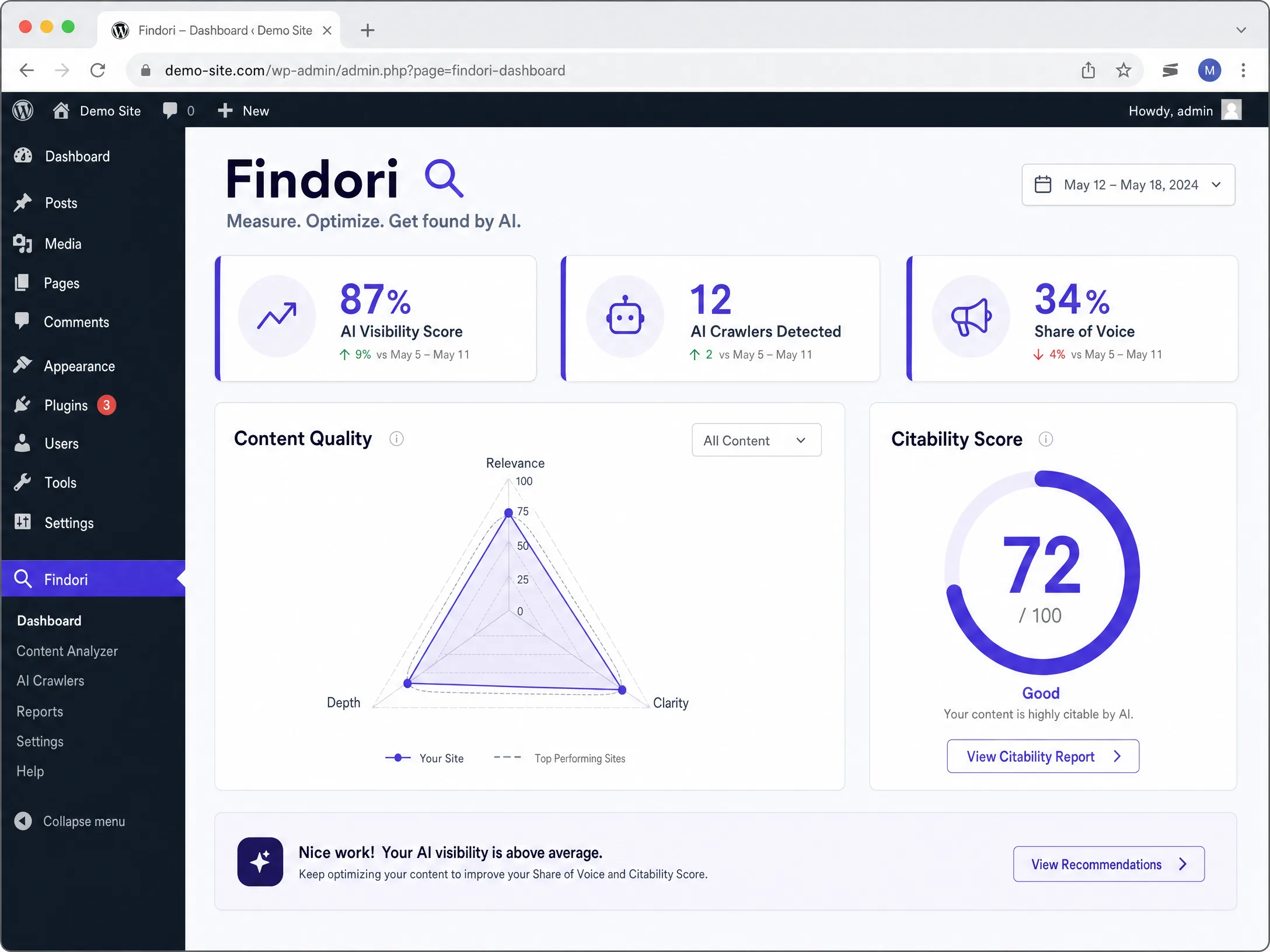
Je ziet direct je AI Visibility Score en een lijst met verbeterpunten. Klik op een aanbeveling om hem toe te passen.
De gratis versie is flink uitgebreid. Je krijgt nu ook een toegangscheck die je site bezoekt als ChatGPT en Perplexity, beeldlabels die AI helpt begrijpen wat op je foto’s staat, sameAs-markup voor je merk op andere platforms, en drie Gutenberg-blokken in de vormen die AI graag citeert. Dat alles gratis, voor één site. Pro voegt de functies toe die bepalen of je ook echt geciteerd wordt: de AI-contentassistent in de editor, de citeerbaarheidscheck met voorkeur-signalen, en het AI-versus-zoekverkeer-dashboard dat laat zien hoe de twee werelden zich tot elkaar verhouden.
Bekijk de pakkettenEenmalig per jaar, geen maandabonnement
Om de basis rustig uit te proberen: llms.txt, schema, crawlerbeheer en het bezoeklogboek.
Begin gratisSolopreneurs en makers die meerdere eigen sites draaien.
Kies ProKleine webshops en actieve niche-publishers.
Kies BusinessBureaus die voor veel klanten tegelijk werken.
Kies AgencyAdd-ons zijn aparte abonnementen die je combineert met Gratis, Pro, Business of Agency.
Steeds meer mensen vragen ChatGPT of Perplexity om een aanrader. De Monitor stelt week na week de vragen die jouw ideale klant zou stellen, en laat je zien of jij in het antwoord staat.
| Plan | Vragen | Frequentie | Per maand | Per jaar |
|---|---|---|---|---|
| Starter | tot 10 | wekelijks | €9 | €90 |
| Pro | tot 20 | dagelijks | €19 | €190 |
| Business | tot 25 | 2× per dag | €39 | €390 |
Klanten vragen ChatGPT, Google en Perplexity steeds vaker welk product ze het beste kunnen kopen. Deze add-on geeft productpagina’s de gegevens waar AI op afgaat, en laat je precies zien waar je catalogus nog tekortschiet.
| Plan | Wat | Per maand | Per jaar |
|---|---|---|---|
| Basis | Schema, checks en readiness-diagnose | €9 | €90 |
| Starter binnenkort | Plus AI-teksten ±300/maand | €19 | €190 |
| Growth binnenkort | Plus AI-teksten ±1.500/maand | €39 | €390 |
| Scale binnenkort | Plus AI-teksten ±6.000/maand | €79 | €790 |
Alle bedragen zijn exclusief btw. Welke btw erbij komt, hangt af van je land.
Bestel een GEO-audit voor €49. Je krijgt een eerlijk rapport met platformscores, citeerbaarheid, schema en een actieplan. Binnen 48 uur in je inbox.
Ja. Findori vult aan wat Yoast en Rank Math laten liggen op het gebied van AI-zichtbaarheid. Er is geen conflict en je hoeft niets te verwijderen.
Nee. Je installeert de plugin zoals elke andere WordPress-plugin, beantwoordt één vraag over je site, en Findori configureert zichzelf.
Gratis dekt de basis: je site is bereikbaar voor AI-crawlers en je krijgt een eerste score. Pro voegt schema per pagina, de contentassistent in de editor en gedetailleerde rapportages toe.
Ja. Juist voor kleine sites is AI-zichtbaarheid interessant, omdat je minder concurrentie hebt dan in Google. Een goed geoptimaliseerde kleine site kan prima geciteerd worden.
De Monitor stuurt dagelijks zoekopdrachten naar AI-assistenten en kijkt of jouw site of naam wordt genoemd. Je krijgt een melding als dat gebeurt, inclusief de context.
Nee. Je betaalt één keer per jaar. Geen verborgen kosten, geen automatische verlenging zonder melding.
Pro dekt 3 sites, Business 15 en Agency 100. Je beheert alles vanuit één licentie.
De plugin optimaliseert je site zodat AI-assistenten je beter kunnen lezen en citeren. De Monitor meet achteraf of dat werkt: hij stelt de vragen die jouw klant zou stellen en laat zien of jij in het antwoord staat.
Je geeft op welke vragen je wilt volgen en wie je concurrenten zijn. De Monitor stuurt die vragen periodiek naar ChatGPT, Perplexity en andere AI-assistenten via OpenRouter, en slaat de antwoorden op.
De WooCommerce add-on voegt gestructureerde productgegevens toe die AI-assistenten nodig hebben om een product aan te bevelen: prijs, voorraad, SKU, merk en beoordelingen in een formaat dat AI direct begrijpt.
Nee. De add-ons werken samen met de Findori-plugin. Je hebt minimaal het gratis pakket nodig. De Monitor werkt ook met het gratis pakket; de WooCommerce add-on vereist WooCommerce op dezelfde site.
Staat je vraag er niet bij? Stel hem via e-mail.
Installeer Findori gratis op je WordPress-site en zie direct je AI Visibility Score.